How Fumi Games blends 2D animation and 3D worlds in Unity for MOUSE: P.I. For Hire
Learn how Fumi Games built a first-person shooter (FPS) in the style of classic rubber hose animation by leveraging the Unity editor’s flexibility and extensibility.
THE CHALLENGE:
Solving compression and memory limits for over 54,000 hand-drawn sprites
PLATFORMS:
PC (Steam), PlayStation®5, Nintendo Switch™ 2, Xbox Series X|S
LOCATION:
Warsaw, Poland
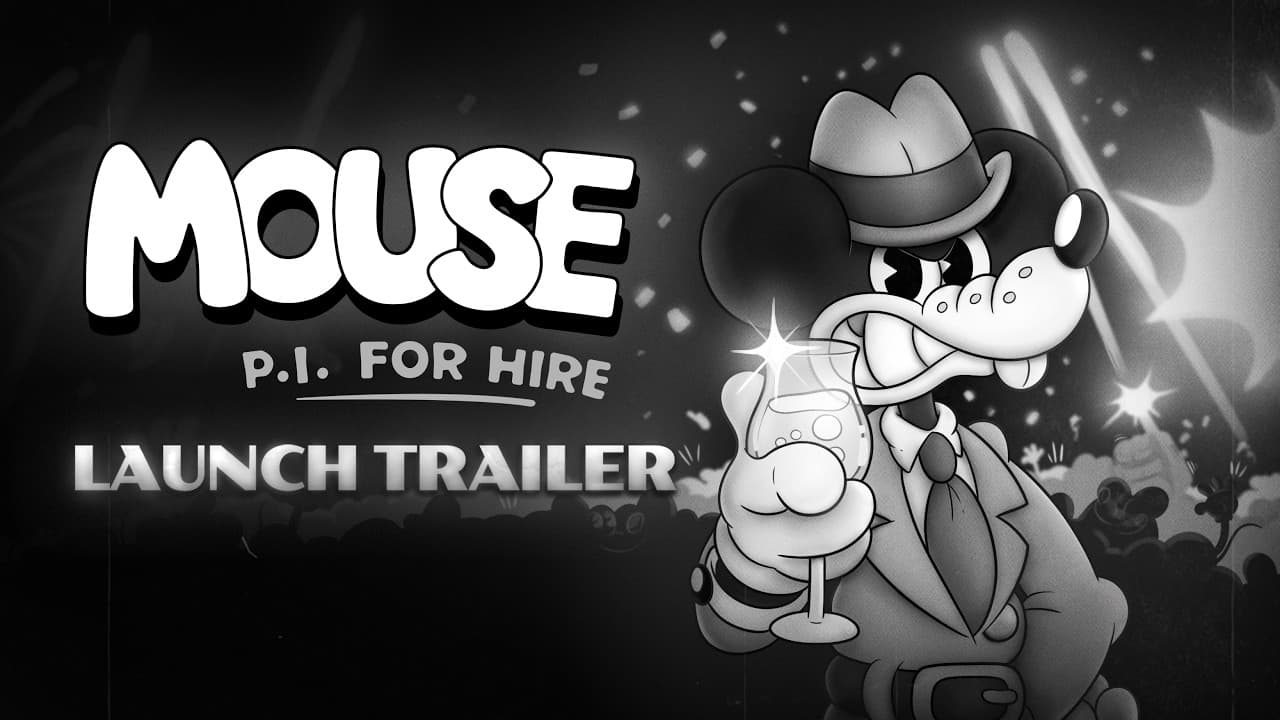
How does a game like MOUSE: P.I. For Hire achieve its unique look with Unity? This debut FPS from Fumi Games has players take on the role of Jack Pepper, a war veteran turned private investigator in the corrupt city of Mouseberg. The idea for this hardboiled, film-noir world originated from a single drawing by the studio’s art director, Michal Rostek, depicting mice dressed in pinstripe suits and brandishing Tommy guns. This inspired the team to create a full game in a rubber hose animation style, a visual approach from the 1930s defined by exaggerated bouncing, stretching, and squeezing.
Fumi Games knew recreating this style in a playable game would be challenging, but their hard work quickly paid off. Early previews of MOUSE: P.I. For Hire instantly went viral thanks to its unique look, and over 1.6 million players wishlisted the game before launch.
Achieving MOUSE’s aesthetic required a clever mix of hand-drawn 2D art and 3D environments, a customized technical pipeline, and an innovative approach to core FPS mechanics. Learn how Fumi Games solved problems like weapon clipping, draw calls, and asset compression to release a performant experience on desktop and consoles.
MOUSE: P.I. For Hire | Fumi Games | PlaySide Studios
The results:
- Achieved 80–100% performance boosts by implementing Hierarchical Level of Detail (HLODs)
- Compressed over 54,000 hand-drawn animated sprites
- Unlocked 50–90% in memory savings with a custom compression solution
- Over 1.6 million wishlists at launch
Investigating rendering solutions
Fumi Games prototyped MOUSE: P.I. For Hire in a different engine, but pivoted to Unity for full production. “The majority of our team were already familiar with it,” says Artur Sołek, graphics programmer at Fumi Games. “MOUSE was going to be heavily stylized, and we believe Unity is the best suite for making a game like this.”
The Universal Render Pipeline (URP) serves as MOUSE: P.I. For Hire's graphics foundation, and was chosen for its extensibility and performance across platforms. “We wanted to keep the project simple,” says Artur. However, Fumi Games didn’t use URP out of the box. They heavily modified the pipeline to create MOUSE: P.I. For Hire’s unique atmosphere, adding custom features like volumetric lighting and a procedural skybox with hand-drawn clouds to enhance the noir-cartoon aesthetic.
MOUSE: P.I. For Hire | Fumi Games | PlaySide Studios
Scoping out the visual direction
MOUSE: P.I. For Hire's core visual concept hinges on a separation of dimensions: All of the environments are fully 3D, while enemies, NPCs, interactive objects, UI, and the player’s weapon are 2D. This deliberate choice helps characters and points of interest stand out against the game’s black and white backdrops.
Working entirely in black and white presented a significant level design challenge. Without the option to use color-coding – for example, the common convention of painting interactable doors or ledges yellow – the developers had to think of news ways to lead the player’s eye. The team ended up relying heavily on custom lighting solutions to guide players through each area. They also established visual guardrails to maintain legibility: interactive objects stand out with specific shading and characteristic rubber hose bounciness, while static 3D background elements are rendered in greyscale without distracting outlines.
“The 3D environment is ultimately just a background – it shouldn’t stand out,” says Artur. “For this reason, we don’t use light on any of our 2D sprites, because we want them to always look the same.”
MOUSE: P.I. For Hire | Fumi Games | PlaySide Studios
Building an asset pipeline
The pipeline for creating MOUSE: P.I. For Hire’s tens of thousands of sprites is simple but robust. Animators work in their preferred software, with final cleanup done using Blender’s Grease Pencil feature for a consistent outline. From there, frames are exported to Adobe After Effects to manage scaling and ensure all textures are sized to a power of two, a critical step for optimization.
Character sprites
MOUSE: P.I. For Hire’s visual direction means characters have to be drawn from up to eight different angles to function as expected in 3D space. The sheer volume of animation required is staggering: A single variation of a typical melee enemy has around 400 hand-drawn frames.
MOUSE: P.I. For Hire | Fumi Games | PlaySide Studios
Weapon sprites
Weapons are even more complex. MOUSE: P.I. For Hire features a varied arsenal, from the classic “Boomstick” shotgun to the “Portable Freezer” freeze gun, each equipped with alternative firing modes once upgraded. Weapons can receive up to three upgrades altering both their appearance and functionality, and these require unique animation frames for each level of progression. This meant that even the smallest visual tweaks to a design could be enormously costly – the shotgun alone required 880 individual animation frames. “If we wanted to change an animation in a weapon, we needed to start this whole process from scratch, which could take months,” says Mateusz Michalak, Fumi Games’s co-founder and CEO.
Asset Store tools
To manage all of these animations in the Unity Editor, the studio uses PowerSprite Animator from the Unity Asset Store, which they found to be better-suited to their needs than the Editor’s built-in Animation System. Since the rubber hose style doesn’t require smooth blending between animations, the advanced features in the Unity Animation System were simply unnecessary. “It’s just simpler and faster for us,” says Artur.
Solving weapon clipping
One of the more innovative technical decisions was to render the player’s weapon as a UI element, rather than as a GameObject existing in the 3D world. This elegantly solves a classic problem in FPS development: weapon clipping, where the gun model pokes through walls or other objects.
However, this solution created a new challenge: how to make 3D visual effects like muzzle flashbacks and the Portable Freezer’s beam appear to originate from these 2D UI elements. “The solution was to calculate where the effect should start in the 2D viewport space and then translate that position in 3D space, just in front of the camera’s near plane,” explains Artur. “It was tricky, but we overcame it.”
MOUSE: P.I. For Hire | Fumi Games | PlaySide Studios
Reducing draw calls
Fumi Games builds each of MOUSE: P.I. For Hire’s 3D levels – spanning over a dozen distinct biomes – using a modular approach, with many small meshes for walls, corners, and props. While flexible, this approach also results in a large number of draw calls. The SRP Batcher was essential for managing this CPU bottleneck, merging draw calls for thousands of objects that can make up a dense city scene.
For larger open scenes, the team implemented Hierarchical Level of Detail (HLODs) which delivered a significant performance boost. “I was testing HLODs implementation and it gave us between 80 to 100% better performance,” Artur notes.
MOUSE: P.I. For Hire | Fumi Games | PlaySide Studios
Managing memory
MOUSE: P.I. For Hire’s primary bottleneck wasn’t rendering, but memory allocation. The game has over 54,000 individual sprite images, and loading them all is not feasible, particularly on consoles. Looking back, the studio says this is one area they could have planned more carefully to avoid optimization challenges. “We never actually calculated how many animations we wanted to have in the game. People are surprised at how many Sprite images we have right now,” laughs Mateusz.
Concept art from MOUSE: P.I. For Hire by Fumi Games, PlaySide Studios
Sprite packing with custom tools
Fumi Games worked closely with their publisher, PlaySide Studios, to develop a custom compression solution that analyzes the flat colors of the sprites and packs the data more efficiently. “Everybody always asks first if we are considering that the sprites are grayscale,” says Victor Nascimento, tech art manager at PlaySide Studios, “But color is not the actual problem, it is the compression algorithm and neither DXT5 or ASTC would work as well, since they compress in blocks that are too small and use too many bytes.”
The final solution breaks the sprite into multiple cells, where each one stores their color if all pixels are the same color or an index into a separate texture, and all non-uniform cells are stored as small textures slices into a large texture nicknamed “Remap.” To bind everything together, a Scripted Importer was created to handle the processing of the original sprites into “Packed Sprites” – Scriptable Objects that can be used at runtime with custom shaders to render the sprites at almost the same speed as a simple texture, but using 50% to 90% less memory.
Tammy Tumbler and the Remap texture of her talking animation.
Key takeaways
By blending the nostalgic, offbeat charm of 1930s rubber hose animation with the fast-paced action of a modern first-person shooter, Fumi Games has carved out a unique space for itself in a crowded genre. Their development journey underscores the importance of a flexible engine and a creative approach to problem-solving. Whether it was by rendering weapons as UI, modifying URP for a striking black and white aesthetic, or engineering compression solutions for tens of thousands of hand-drawn frames, Fumi Games consistently pushed the boundaries of what a hybrid 2D/3D pipeline can achieve.
MOUSE: P.I. For Hire's simultaneous launch on PC and consoles demonstrates the power of a strong artistic vision backed by rigorous technical execution. For developers looking to embark on a similar journey, Fumi Games offers three pieces of parting advice:
“One: Stick to a long-term support (LTS) version of your engine. Two: Test on your lowest-spec platforms from day one. Three: Always, always plan your animation scope in advance!”
Make games with Unity
Build 2D and 3D experiences in any style, for any platform. The Unity engine gives you the power and flexibility to realize your creative vision.